AI Certificate of Coverage Comparison Agent
Automating Certificate of Coverage Comparison with AI
Validate Endorsements, Not Just Checkboxes
The agent parses actual endorsement documents to confirm Additional Insured, Waiver of Subrogation, and Primary & Non-Contributory status—because COI checkboxes alone don't transfer risk.
Surface Policy Changes That Matter
Automated diff analysis compares current submissions against prior COIs to flag limit decreases, carrier changes, removed endorsements, and altered retro dates with clear risk impact assessments.
Keep Vendor Files Compliant Year-Round
Continuous monitoring tracks expirations, triggers renewal requests, and alerts teams to mid-term cancellations—replacing manual spreadsheets with always-current compliance status.
How Cassidy automates Certificate of Coverage Comparison using AI
Step 1: Trigger on COI submission
The Workflow activates when a certificate arrives—via email, secure portal upload, or API integration from your procurement or project management system.
Step 2: Classify and extract document data
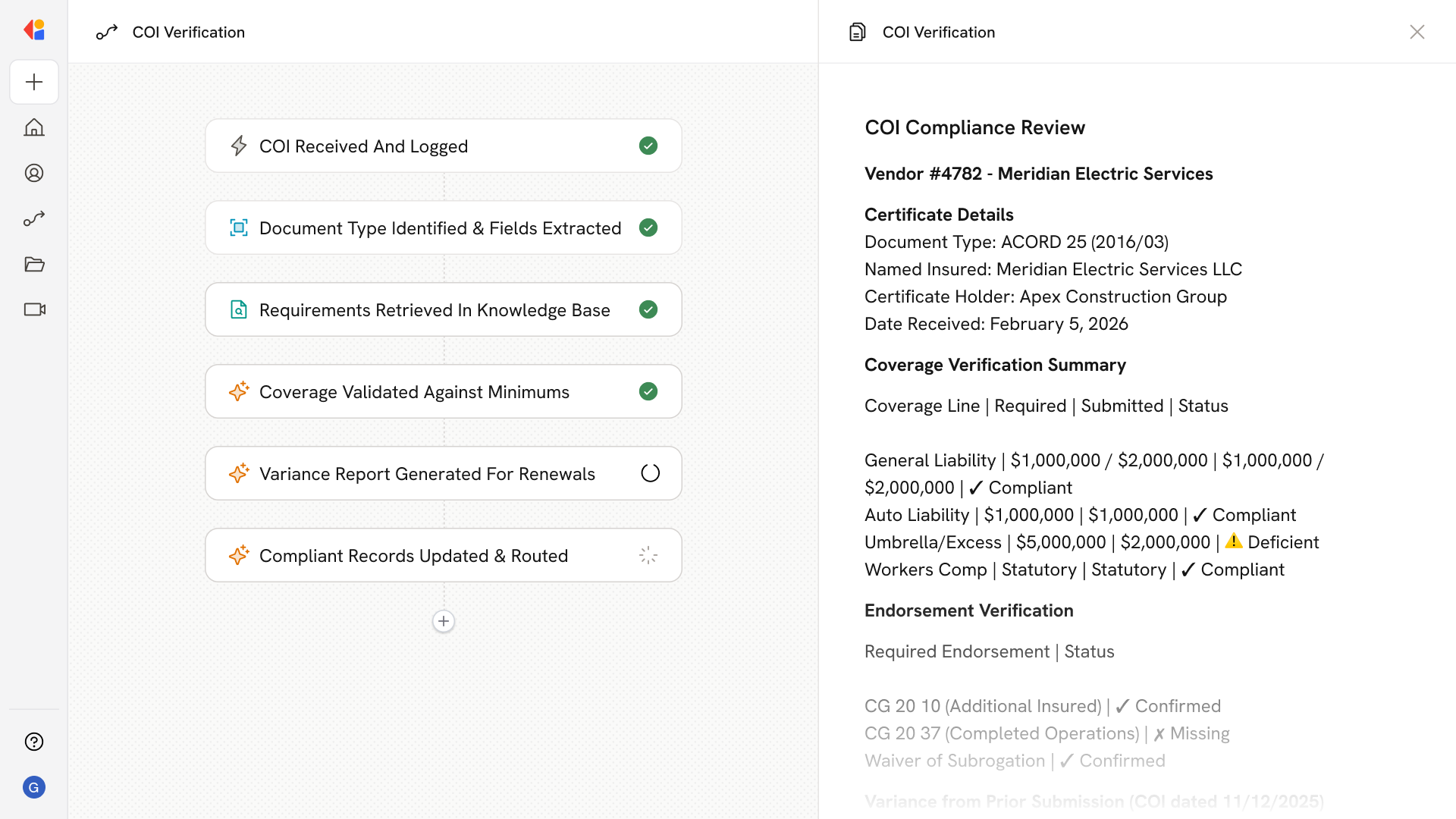
Cassidy identifies the document type (ACORD 25, endorsements, additional remarks) and extracts structured fields: named insured, certificate holder, carriers, policy numbers, coverage lines, limits, effective dates, and endorsement identifiers like CG 20 10 or CG 20 37.
Step 3: Pull requirements from Knowledge Base
The agent retrieves the applicable requirements matrix from your Knowledge Base—coverage minimums, mandatory endorsements, entity name requirements, and project-specific terms stored from your contract language.
Step 4: Validate coverage against requirements
Cassidy compares extracted data to the requirements checklist: confirms limits meet minimums, verifies date overlaps with project terms, checks that endorsements substantiate Additional Insured and Waiver of Subrogation status, and flags name mismatches or missing coverage lines.
Step 5: Generate diff report against prior submissions
For renewals or updated COIs, the Workflow produces a variance analysis highlighting changes in limits, carriers, endorsement scope, aggregate application, and retro dates—with risk impact notes for each change.
Step 6: Route for decisioning or remediation
Compliant submissions update vendor records automatically. Deficient COIs trigger correction requests to the vendor or broker with specific asks—missing endorsement form numbers, required limit increases, or entity name corrections—keeping humans in the loop for exceptions.
Implement it inside your company
- Hands-on onboarding and support
- Self-paced training for your team
- Dedicated implementation experts
- Ongoing use case discovery
- ROI tracking & analytics dashboards
- Proven playbooks to get started fast