AI Traffic Report Agent
Automating Multi-Site Traffic Performance Reporting with AI
Unified Data Ingestion Across Your Client Portfolio
The agent connects to GA4 and GSC for every client property, normalizing metrics and dimensions into a single schema so you can compare performance across sites without manual data wrangling.
AI Referral Classification and Tracking
Automated channel grouping identifies traffic from ChatGPT, Perplexity, Claude, Gemini, and other AI assistants—surfacing a previously hidden source of sessions and conversions across your portfolio.
Anomaly Detection with Root-Cause Context
Time-series models flag significant traffic shifts, then drill down by source, landing page, device, and query to pinpoint drivers and deliver actionable alerts instead of noise.
How Cassidy automates site traffic reporting using AI
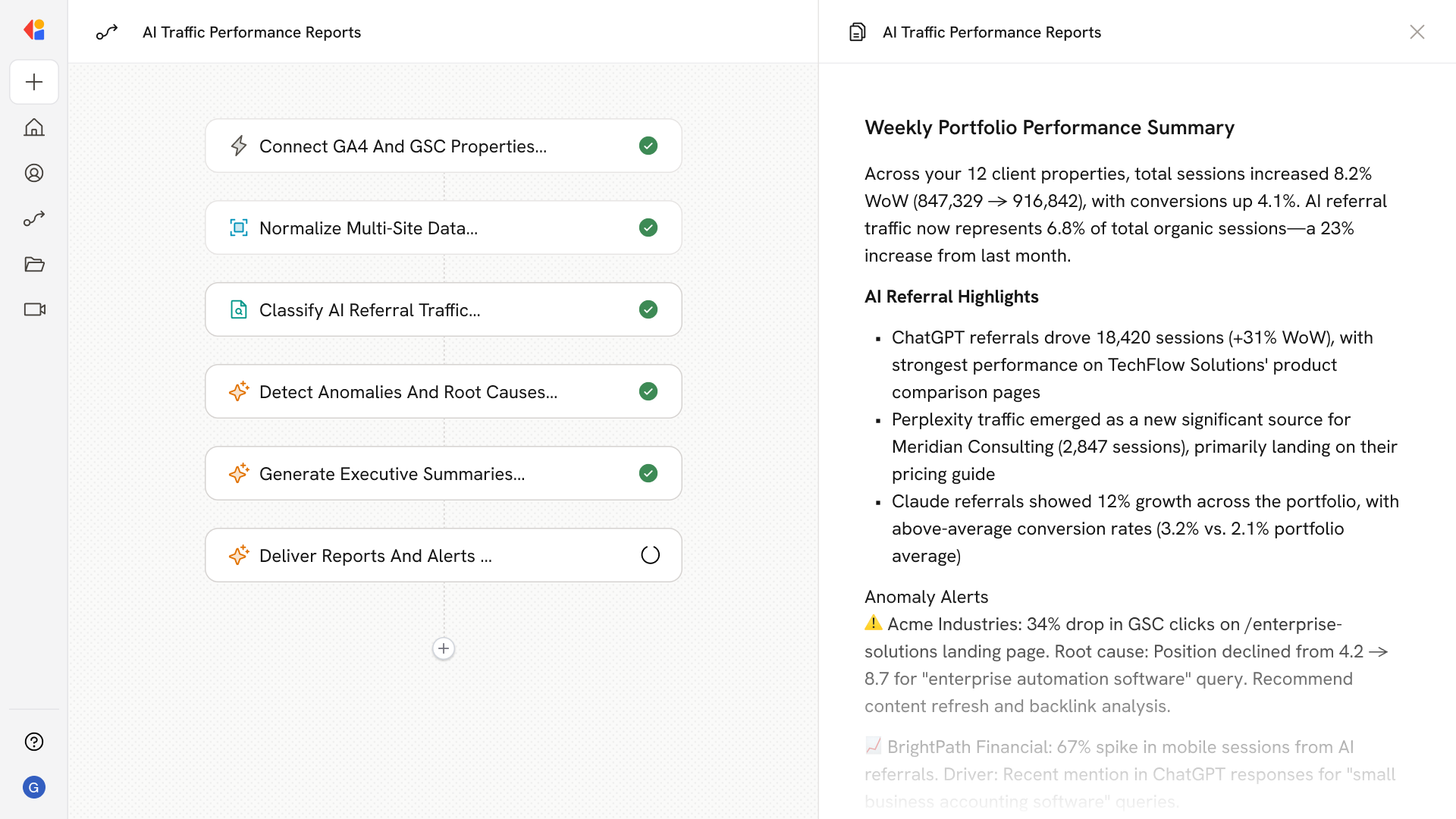
Step 1: Connect GA4 and GSC properties
Cassidy authenticates to each client's GA4 Data API and GSC Search Analytics API, pulling sessions, conversions, clicks, impressions, and position data on a scheduled cadence—daily for KPIs, hourly for anomaly monitoring.
Step 2: Normalize and unify multi-site data
The Workflow standardizes metrics across properties, harmonizing time zones, currencies, and conversion definitions while tagging each record with client and site identifiers for portfolio-wide analysis.
Step 3: Classify AI referral traffic
Cassidy applies custom channel grouping rules using regularly updated regex patterns to surface traffic from AI assistants like ChatGPT, Perplexity, Claude, and Gemini—separating it from organic and direct channels.
Step 4: Detect anomalies and identify root causes
Time-series baselines flag significant WoW or MoM changes, then Cassidy automatically pivots by source, landing page, device, and GSC query to surface the drivers behind each spike or drop.
Step 5: Generate executive summaries
Cassidy synthesizes trends, KPI attainment, AI referral highlights, and top recommendations into stakeholder-ready narratives—formatted for weekly or monthly delivery.
Step 6: Deliver reports and alerts
Completed summaries and anomaly alerts route to Slack, Teams, or email, with optional PDF exports and per-client or portfolio roll-up views—keeping your team and clients informed without manual effort.
Implement it inside your company
- Hands-on onboarding and support
- Self-paced training for your team
- Dedicated implementation experts
- Ongoing use case discovery
- ROI tracking & analytics dashboards
- Proven playbooks to get started fast