Workers Compensation Census
What does this mean?
Underwriting and brokerage teams produce accurate, consistent WC submissions faster, reducing manual lookup time and improving quote turnaround.
How it works?
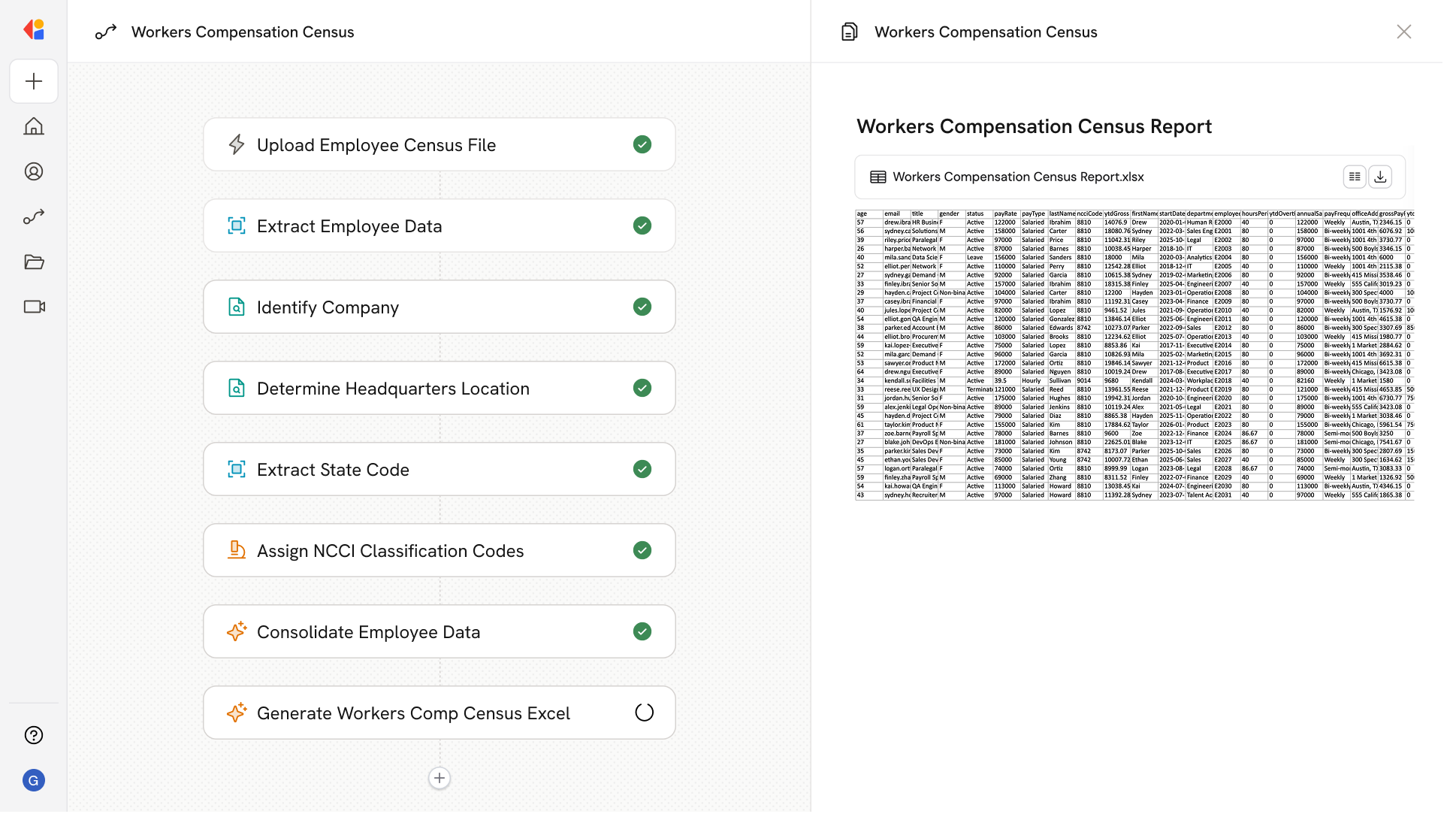
Ingests employee census data, looks up company headquarters, maps job titles to NCCI classification codes, and outputs a complete workers compensation report in an Excel workbook with employee details and class codes.
Workflow steps
Step 1: Upload employee census data
The Workflow begins with a manual trigger where the user uploads the employee census file containing workforce details such as names, job titles, and employment information.
Step 2: Extract employee information
Cassidy parses the uploaded census data, using a Loop action to process each employee record and extract key details including job titles, locations, and other relevant fields.
Step 3: Research company headquarters
The Research Agent searches the internet to identify and verify the company's headquarters location—critical for determining applicable state regulations and classification requirements.
Step 4: Map job titles to NCCI classification codes
Using Generate Text with Cassidy Assistant, the Workflow analyzes each employee's job title and matches it to the appropriate NCCI (National Council on Compensation Insurance) classification code, drawing on industry standards and job duty descriptions.
Step 5: Compile workers compensation report
The Combine Text action aggregates all extracted employee data, headquarters information, and assigned classification codes into a structured format ready for export.
Step 6: Generate Excel workbook
The Workflow exports the complete workers compensation report as an Excel file, organizing employee details, class codes, and location data into a submission-ready workbook for underwriting review.
Implement it inside your company
- Hands-on onboarding and support
- Self-paced training for your team
- Dedicated implementation experts
- Ongoing use case discovery
- ROI tracking & analytics dashboards
- Proven playbooks to get started fast