AI Multi-KPI Dashboard Report Agent
Automating Multi-KPI Dashboard Reporting with AI
Unified Data Integration and KPI Standardization
The system connects to dozens of marketing platforms—Google Ads, Meta, LinkedIn, CRM, and ecommerce—normalizing metrics into a governed data model with consistent definitions for ROAS, CPA, CTR, and other KPIs across all channels and clients.
AI-Powered Insights and Anomaly Detection
Automated analytics continuously scan performance data to surface natural-language explanations of what changed and why, flag statistically significant anomalies in spend or conversions, and deliver prescriptive recommendations for budget reallocation or campaign adjustments.
White-Label Reporting and Client Portals
Branded dashboards, scheduled PDF reports, and self-serve portals give clients real-time visibility into multi-KPI performance—complete with executive narratives, goal tracking, and the ability to ask questions in natural language.
How Cassidy automates multi-KPI dashboard reports using AI
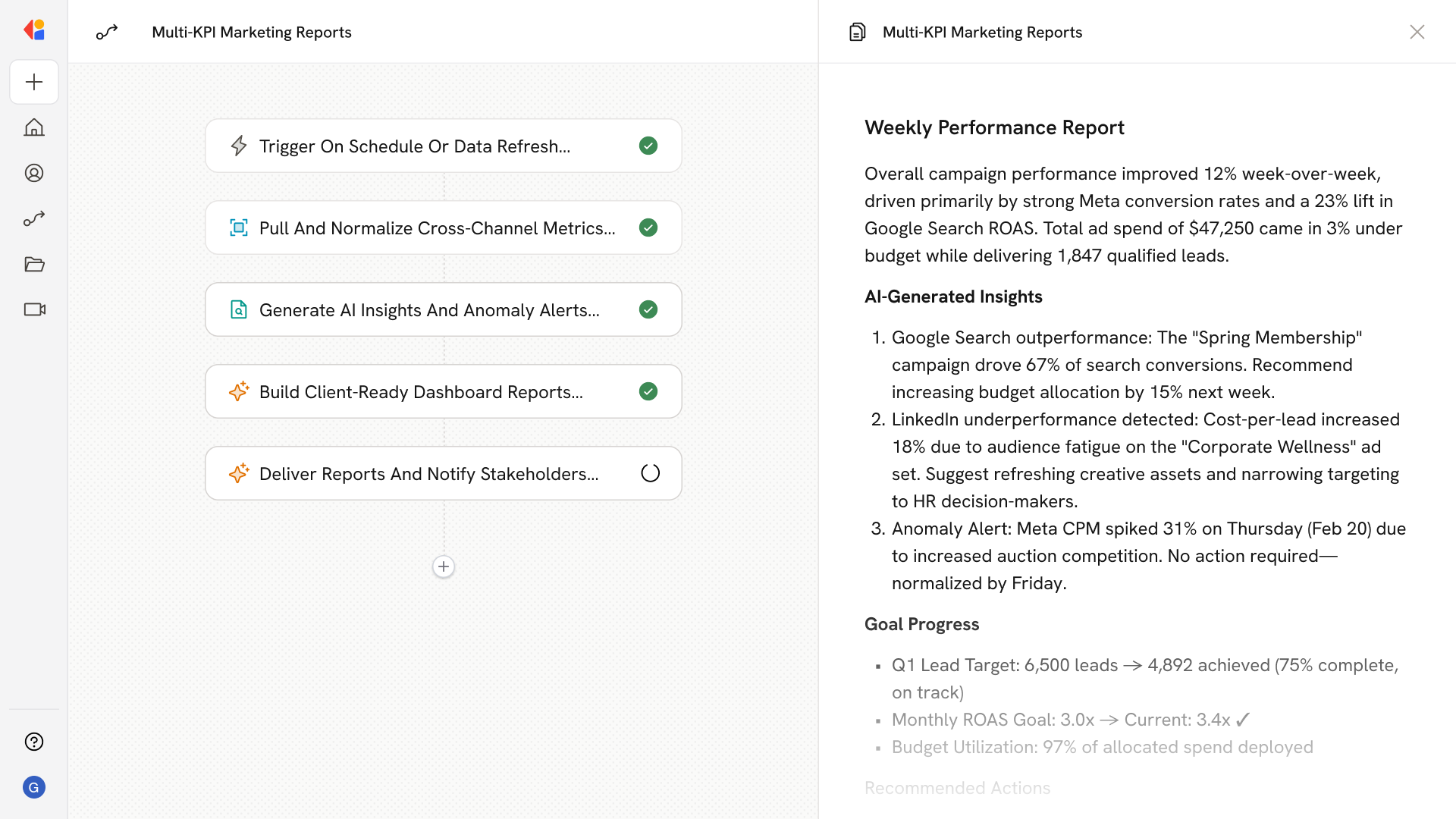
Step 1: Trigger on reporting schedule or data refresh
The Workflow activates automatically on a defined cadence—daily, weekly, or monthly—or triggers when new data syncs from connected marketing platforms, CRM, or analytics sources.
Step 2: Pull and normalize cross-channel data
Cassidy retrieves performance metrics from your Knowledge Base and connected integrations, normalizing campaign naming conventions, aligning time zones and currencies, and mapping fields to your standardized KPI definitions.
Step 3: Generate AI-powered insights and anomaly alerts
The Agent analyzes KPI trends across channels, surfaces key drivers behind performance changes, detects statistically significant anomalies in spend, ROAS, or conversion rates, and produces natural-language explanations with prescriptive recommendations.
Step 4: Build client-ready dashboard reports
Cassidy compiles the insights into white-label reports with executive summaries, goal progress tracking, benchmark comparisons, and visualizations tailored to each client's brand and reporting preferences.
Step 5: Deliver reports and notify stakeholders
The Workflow distributes finished reports via email, Slack, or Teams, updates client portals with fresh dashboards, and sends targeted alerts when KPIs breach thresholds or require immediate attention.
Implement it inside your company
- Hands-on onboarding and support
- Self-paced training for your team
- Dedicated implementation experts
- Ongoing use case discovery
- ROI tracking & analytics dashboards
- Proven playbooks to get started fast