AI Client Sentiment Monitoring Agent
Automating Client Sentiment Monitoring with AI
Unified feedback capture across every client touchpoint
The agent ingests signals from emails, Slack channels, call transcripts, support tickets, surveys, and QBR notes—stitching contacts to the correct account and enriching each interaction with context like stakeholder role, service line, and lifecycle stage.
Context-aware sentiment analysis that catches what matters
AI processing detects aspect-based sentiment (reporting quality, creative turnaround, billing accuracy), identifies emotion and intent, and surfaces anomalies like sudden negative spikes or exec-level complaints before they escalate.
Intelligent alerts routed to the right owner, instantly
When risk signals emerge, the system triggers role-aware alerts to the appropriate AM, discipline lead, or exec sponsor—complete with AI-summarized context, suggested next steps, and automatic case creation in your ticketing or project management tool.
How Cassidy automates client sentiment monitoring using AI
Step 1: Trigger on new client feedback
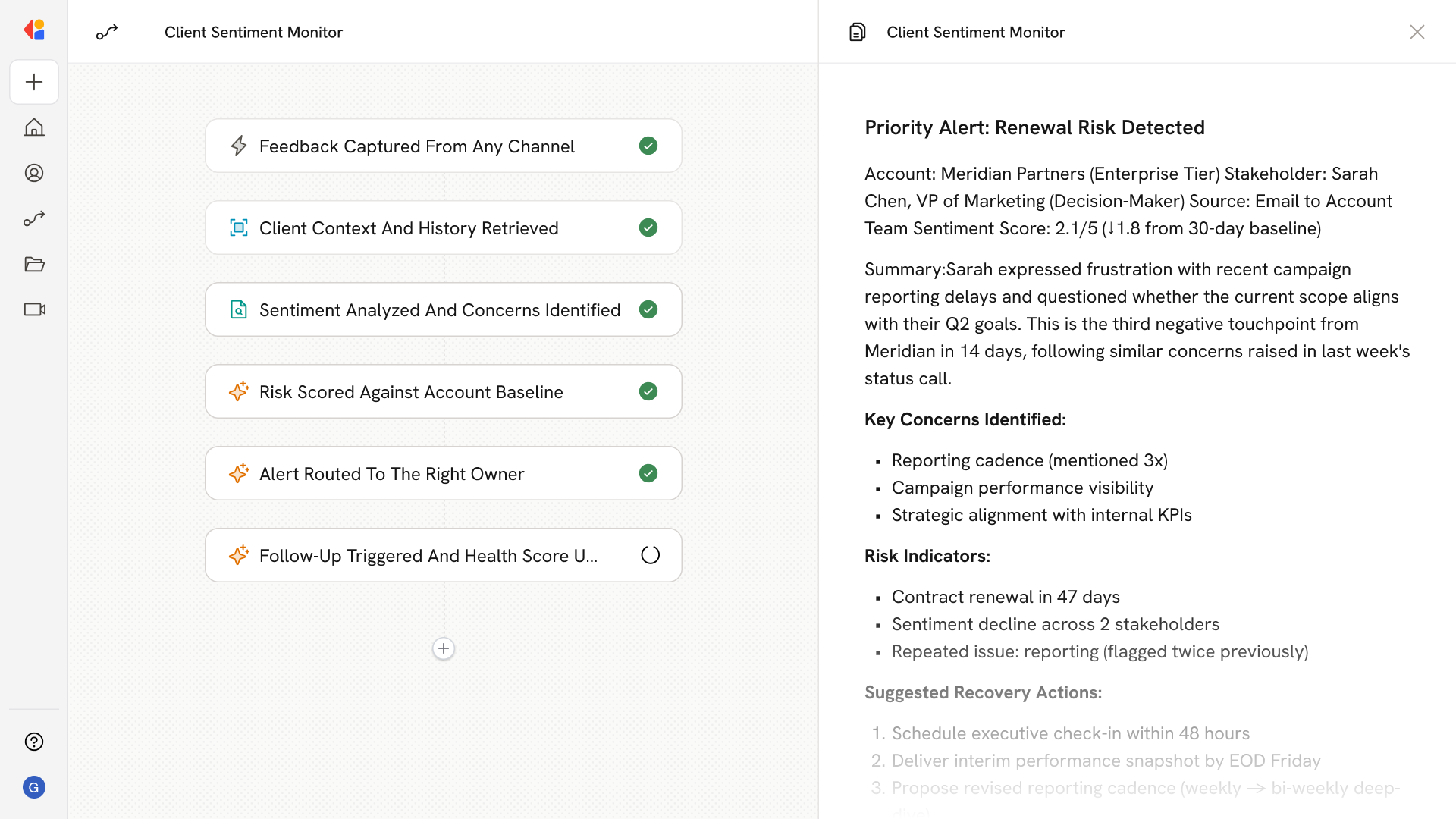
The Workflow activates when feedback arrives from any connected source—a Slack message in a client channel, an email to your team, a survey response, a support ticket, or a transcribed call recording.
Step 2: Enrich and contextualize the signal
Cassidy maps the feedback to the correct client account, tags the stakeholder role (decision-maker vs. day-to-day contact), and pulls relevant context from your Knowledge Base—including account tier, active campaigns, recent delivery history, and past sentiment trends.
Step 3: Analyze sentiment and extract insights
The Agent applies aspect-based sentiment analysis to identify specific concerns (e.g., reporting cadence, creative quality, media performance), detects emotion and intent, and flags whether the feedback represents a potential escalation, renewal risk, or service request.
Step 4: Score risk and detect anomalies
Cassidy cross-references the new signal against the account's health score and historical sentiment baseline, surfacing anomalies like repeated negative feedback on the same aspect or a sudden sentiment drop from a key stakeholder.
Step 5: Route alerts with full context
Based on severity, account tier, and topic, Cassidy routes a prioritized alert to the right owner—AM, delivery lead, or exec sponsor—via Slack, Teams, or email, including an AI-generated summary, relevant snippets, and suggested recovery actions.
Step 6: Create and track the case
The Workflow automatically creates a ticket in your project management or support system (Jira, HubSpot, Zendesk) with the context, assigns ownership, sets SLA timelines, and tracks the case through resolution.
Step 7: Close the loop and update health metrics
After resolution, Cassidy triggers a follow-up micro-survey, logs the outcome, updates the account health score, and feeds insights back into your Knowledge Base—so your QBR reports reflect the before-and-after impact of every intervention.
Implement it inside your company
- Hands-on onboarding and support
- Self-paced training for your team
- Dedicated implementation experts
- Ongoing use case discovery
- ROI tracking & analytics dashboards
- Proven playbooks to get started fast