AI Client Request Routing Agent
Automating Client Request Triage and Routing with AI
Intelligent Intent Detection and Classification
The agent automatically analyzes incoming requests across email, Slack, chat, and web forms to identify intent, extract key entities like campaign names and platforms, and assess sentiment—eliminating manual triage and misrouting.
Skills-Based, Capacity-Aware Assignment
Requests route to the right resource based on required expertise (paid media, SEO, creative, dev), language capabilities, certifications, and real-time availability—ensuring balanced workloads and faster resolution.
Priority Scoring and SLA Alignment
Each request receives a priority score based on client tier, urgency, business impact, and due dates, then maps to SLA targets so high-value work moves to the front of the queue.
How Cassidy automates client request routing using AI
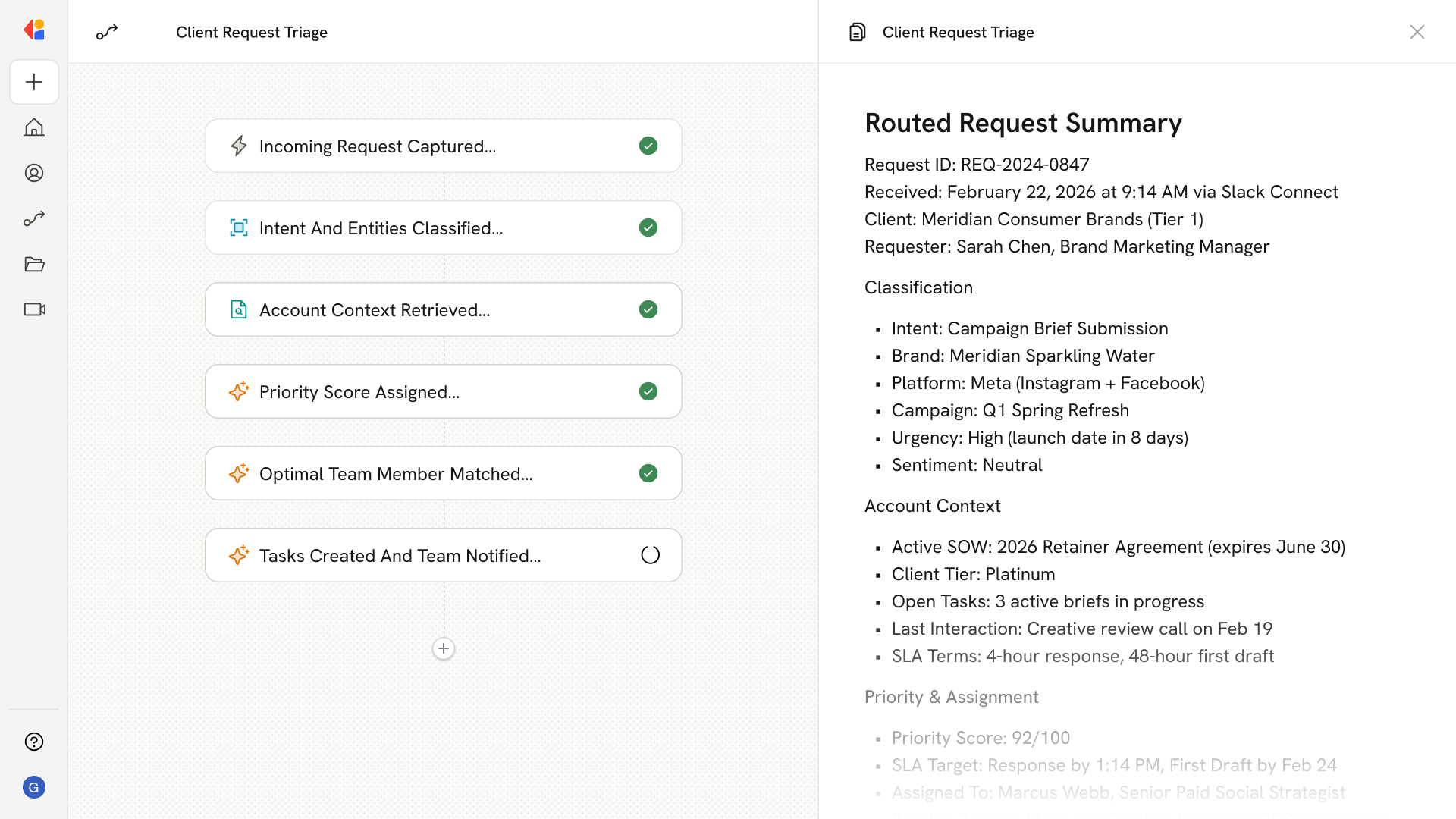
Step 1: Trigger on incoming client request
The Workflow activates when a new request arrives from any channel—email, Slack Connect, web form, or helpdesk ticket—capturing the message content, requester metadata, and channel context.
Step 2: Classify intent and extract entities
Cassidy analyzes the request to detect intent (campaign brief, ad change, billing inquiry, bug report), extract structured entities (brand, platform, campaign, language/region), and assess sentiment and urgency.
Step 3: Enrich with account context
The Workflow pulls relevant context from your CRM and project management tools—client tier, active SOW, open tasks, historical interactions, and SLA terms—to inform routing and prioritization.
Step 4: Score priority and assign SLA
Cassidy applies business rules to calculate a priority score based on client value, request urgency, and due dates, then maps the request to the appropriate SLA targets for response and resolution.
Step 5: Match to optimal resource
Using skills-based routing logic, Cassidy identifies the best-fit team member or queue based on required expertise, certifications, language capabilities, and current workload—or routes routine requests to an AI Agent for immediate resolution.
Step 6: Create tasks and notify the team
The Workflow generates tasks in your project management tool (Asana, Monday, Teamwork), links them to the relevant campaign or SOW, and sends notifications to the assigned team member via Slack or Teams with full request context.
Step 7: Track resolution and update the client
As work progresses, Cassidy monitors SLA status, logs outcomes, and sends updates to the client through their preferred channel—keeping threaded context intact and capturing satisfaction feedback at close.
Implement it inside your company
- Hands-on onboarding and support
- Self-paced training for your team
- Dedicated implementation experts
- Ongoing use case discovery
- ROI tracking & analytics dashboards
- Proven playbooks to get started fast