AI Campaign Launch Checklist Agent
Automating Campaign Launch Checklists with AI
Pre-flight QA that catches issues before they cost you
The agent validates every destination URL, checks HTTP status codes and redirect chains, confirms mobile responsiveness, and verifies that forms and tracking are functioning—flagging problems before a single dollar is spent.
UTM and pixel validation that protects attribution
Automated workflows crawl ad destinations to verify UTM parameters follow your taxonomy, confirm pixels fire with correct event parameters, check Conversions API deduplication, and ensure consent mode compliance—eliminating the manual QA that buries your team.
72-hour monitoring that catches signal breaks early
The system watches delivery pacing, conversion signals, and event match quality during the critical learning phase, alerting your team to zero-delivery, spend anomalies, or broken tracking before they derail campaign performance.
How Cassidy automates campaign launch checklists using AI
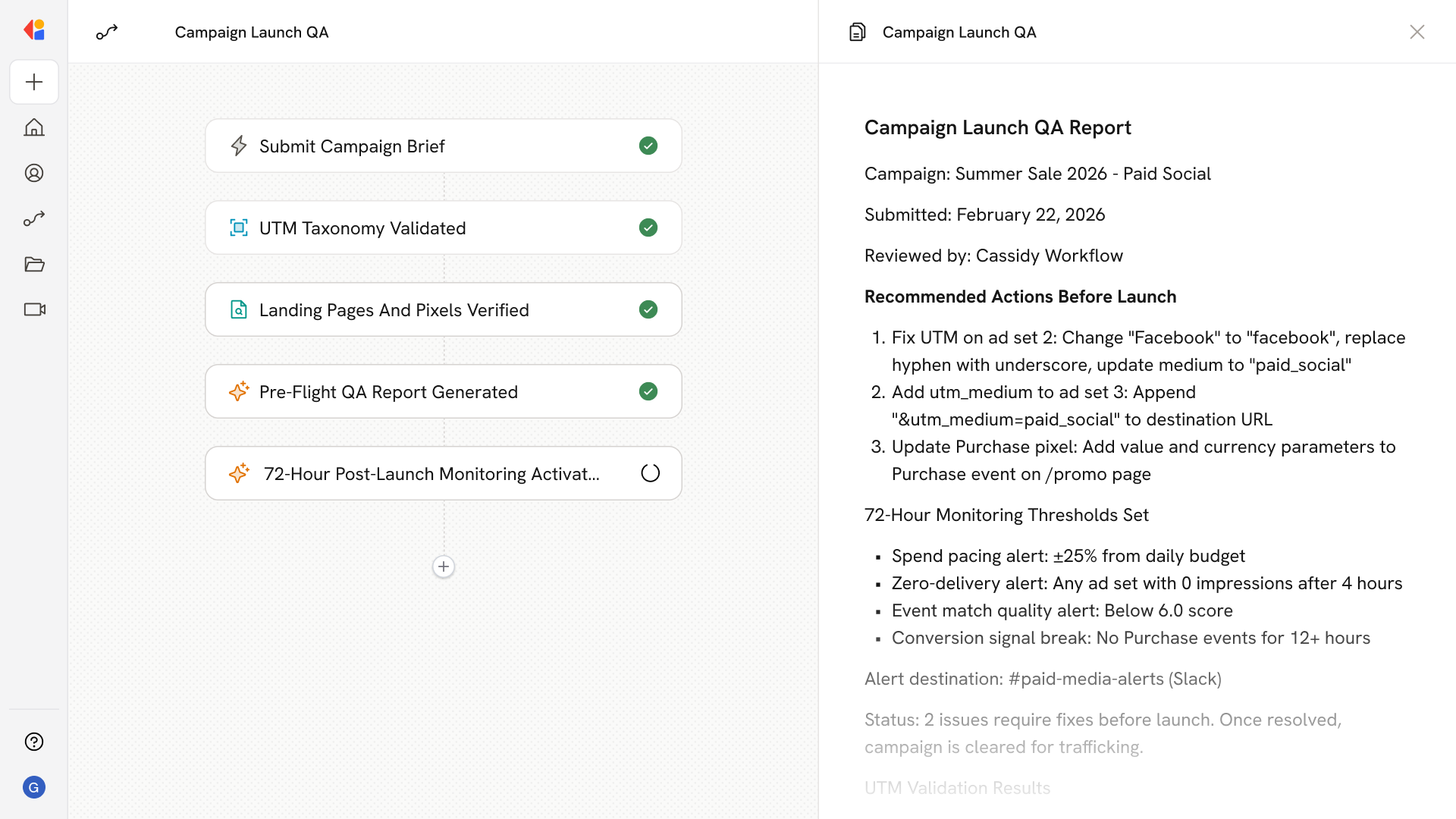
Step 1: Trigger on campaign brief submission
The Workflow activates when a trafficking sheet or campaign brief is submitted—whether uploaded to Google Drive, shared via Slack, or entered through a form—pulling in creative details, targeting parameters, budgets, flight dates, and destination URLs.
Step 2: Parse and validate UTM taxonomy
Cassidy extracts all tagged URLs from the brief, checks each against your UTM naming conventions stored in the Knowledge Base, and flags any that use incorrect case, invalid separators, missing required parameters, or values outside your controlled vocabulary.
Step 3: Crawl destinations and verify tracking
The Workflow tests each landing page for HTTP status, redirect chains, mobile responsiveness, and consent banner functionality, then verifies that pixels fire correctly with required event parameters and that Conversions API events deduplicate properly against web events.
Step 4: Generate pre-flight QA report
Cassidy compiles validation results into a structured QA report—documenting passed checks, flagged issues, and recommended fixes—then routes it to the appropriate team member for review before launch.
Step 5: Monitor the first 72 hours post-launch
Once campaigns go live, Cassidy monitors delivery pacing, conversion signals, and event match quality against your thresholds, sending alerts to Slack or Teams when spend anomalies, zero-delivery, or signal breaks are detected—with kill-switch recommendations ready if needed.
Implement it inside your company
- Hands-on onboarding and support
- Self-paced training for your team
- Dedicated implementation experts
- Ongoing use case discovery
- ROI tracking & analytics dashboards
- Proven playbooks to get started fast