QBR Auto-Builder
What does this mean?
Removes the manual busywork from preparing business reviews so customer teams can deliver consistent, insight-rich presentations at scale, surface expansion opportunities, and proactively guide account plans.
How it works?
Collects product usage, support history, goals, and insights from meetings and CRM notes, then creates ready-to-deliver QBR decks and reports with highlights, risks, outcomes, recommendations, and next-quarter goals—including clear charts and cited evidence.
Workflow Steps
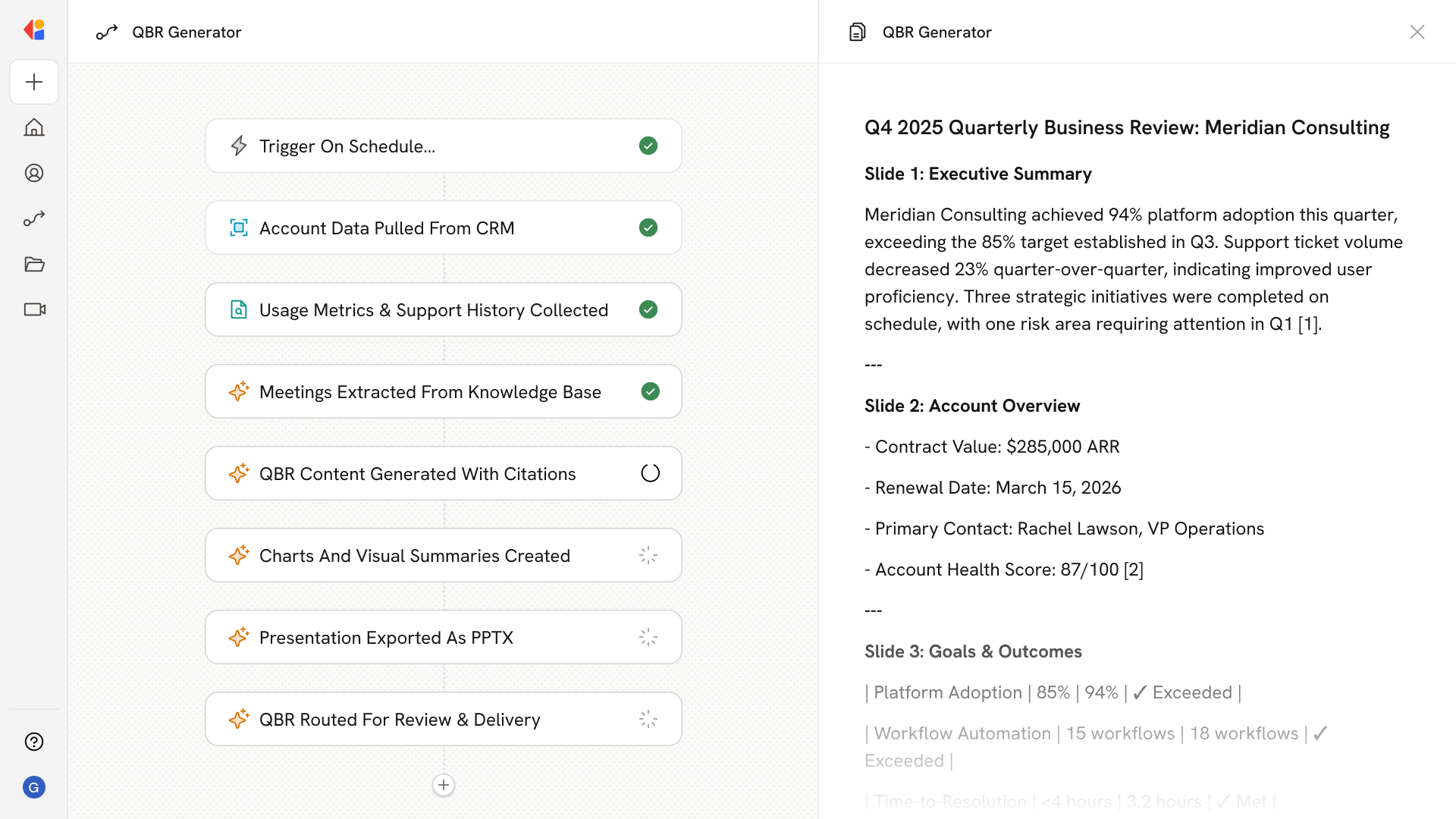
Step 1: Trigger on schedule or manual request
The Workflow activates on a set schedule (e.g., monthly or quarterly) or when a team member manually triggers it for a specific account—ensuring QBRs are always prepared on time.
Step 2: Pull account data from CRM
Cassidy connects to your CRM to gather account details, customer goals, contract information, and historical notes—building the foundation for a complete business review.
Step 3: Collect product usage and support history
The Workflow pulls product usage metrics and support ticket history from connected systems, surfacing adoption trends, recurring issues, and resolution patterns.
Step 4: Extract insights from meeting notes
Using your Knowledge Base, Cassidy reviews recent meeting transcripts and call notes to identify key themes, customer feedback, and commitments made throughout the quarter.
Step 5: Generate QBR content
Cassidy synthesizes all collected data to generate highlights, risks, outcomes achieved, strategic recommendations, and next-quarter goals—complete with cited evidence from your sources.
Step 6: Build charts and visual summaries
The Workflow formats key metrics into clear charts and visual summaries, making it easy for stakeholders to grasp performance at a glance.
Step 7: Export as a presentation or document
Cassidy compiles everything into a ready-to-deliver QBR deck or report, exported as a Microsoft Word document or presentation format of your choice.
Step 8: Route for review and delivery
The completed QBR is sent to the account team for final review via Human-in-the-Loop approval, giving them a polished, insight-rich presentation ready to share with the customer.
Implement it inside your company
- Hands-on onboarding and support
- Self-paced training for your team
- Dedicated implementation experts
- Ongoing use case discovery
- ROI tracking & analytics dashboards
- Proven playbooks to get started fast