CRM Auto-Enrichment
What does this mean?
Delivers cleaner, more complete records with less manual cleanup—improving lead routing, personalization, and conversion speed while reducing bounces, duplicates, and data drift.
How it works?
Uses research agents to scour company sites, LinkedIn, and public web sources to enrich contacts and accounts with firmographics, titles/roles, and verified emails—supplementing with third‑party providers (e.g., Apollo, ZoomInfo, Clearbit) as needed—then writes standardized updates to the right CRM records with built‑in hygiene (deduping by email/domain, fuzzy name/title matching, merge rules, and conflict flags).
Workflow steps
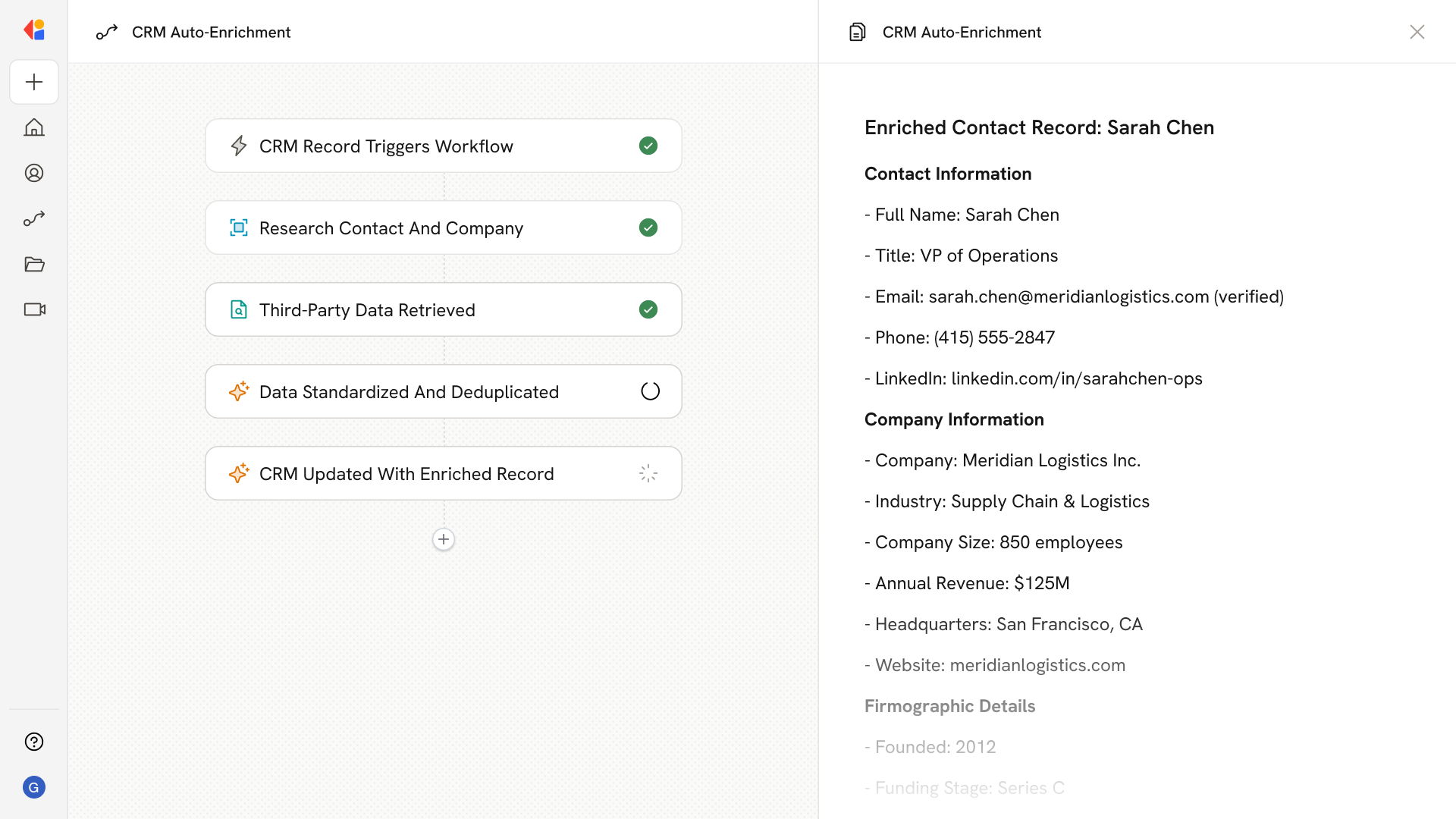
Step 1: Trigger on new or updated CRM record
The Workflow activates automatically when a new contact or account is created—or when an existing record is flagged for enrichment—in Salesforce or HubSpot.
Step 2: Research the contact and company
Cassidy scours company websites, LinkedIn profiles, and public web sources to gather firmographics, job titles, roles, and other relevant details about the contact and their organization.
Step 3: Supplement with third-party data
If gaps remain, the Workflow pulls verified emails, company size, industry, and additional firmographic data from third-party providers like Apollo, ZoomInfo, or Clearbit.
Step 4: Standardize and deduplicate
The Workflow applies built-in hygiene rules—deduping by email or domain, fuzzy matching on names and titles, and flagging conflicts when data sources disagree.
Step 5: Write enriched data back to CRM
The Workflow updates the correct CRM records with standardized, enriched information—ensuring cleaner data for lead routing, personalization, and faster follow-up without manual cleanup.
Implement it inside your company
- Hands-on onboarding and support
- Self-paced training for your team
- Dedicated implementation experts
- Ongoing use case discovery
- ROI tracking & analytics dashboards
- Proven playbooks to get started fast